What is BeOS?
BeOS was a proprietary (not
open) OS released in 1995 for the IA-32 (32-bit x86) and
PowerPC architectures. BeOS is very similar to Unix
although it is not a clone or related distribution. The biggest
difference is Be File System (BFS) that behaves as a database
using meta tags.
Around 2001, there was even a version of BeOS for Internet
Appliances (BeIA) that used Opera 4.0 as its GUI and a variation
of its file system referred to as CFS (Compressed File System).
At the time, this was fairly innovative as similar web-devices
ran mostly buggy Java applets or the highly inefficient Windows
CE. Ironically BeOS family of systems eventually died off in
favor of the inferior quality of the Windows
family of systems.
Because some systems still run no-longer-supported BeOS,
developers have continued its development under the name Haiku,
which is covered next on this page.
Haiku:
Haiku was originally released in 2002 for IA-32, ARM and
x86-64 architectures as an update for BeOS 5.0.3 as the OpenBeOS
project (2001). Just like BeOS, Haiku uses the Be File System
(BFS) that works as a metadata database running on a 400 MHz
microprocessor, 128 MB of RAM and 700 MB of HDD space.
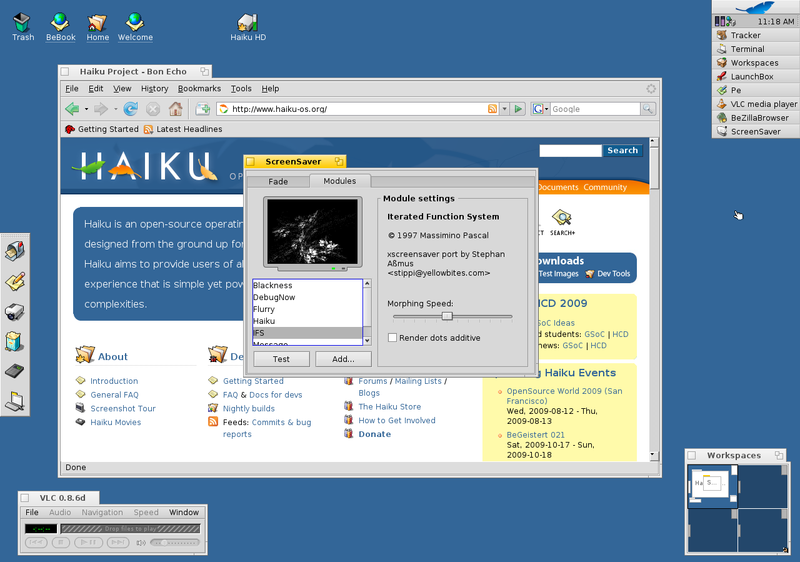
Haiku is partially POSIX-complaint and even includes the
Bash-like shell without learning curve.
As with most systems, Haiku is as good as its application
library. Haiku serves as a means to extend the life of old BeOS
applications as well as new ones specifically designed for
Haiku.
Installing BeOS (Haiku):
I have only been able to install Haiku on a VDI, not as a sole
OS on a HDD or partition using its .ISO image.
Unfortunately, as of mid-2022, the VDI freezes when using
VirtualBox running on Linux to
the point that I have been forced to reboot my laptop as all
applications fail to respond. As such, the image or the OS itself
is nonoperational. I hope the error is in the image or
configuring the VDI as I really like the Haiku project.
Like most operating systems nowadays, the installation is
handled by a live disk. The process is straight forward. It loads
all necessary drivers including the 802.11 adapter and there is
barely any configuration needed.
Although Haiku recommends running its nightly builds, I have
found them buggy especially when running the default web browser
known as WebPositive, which depending on the version has not let
me log in to my Google account.
